How to Avoid Content ID Claims on YouTube
Content ID claims can affect YouTube monetization, video visibility, ad revenue, sponsored content, client delivery, and long-term creator workflows.
You cannot guarantee that automated systems will never flag a video. But you can reduce Content ID problems by using music with clear licensing terms, checking Content ID policies, and keeping proof of permission before uploading.
This guide gives creators, YouTubers, brands, agencies, editors, and businesses a practical checklist for reducing Content ID claims before publishing videos.
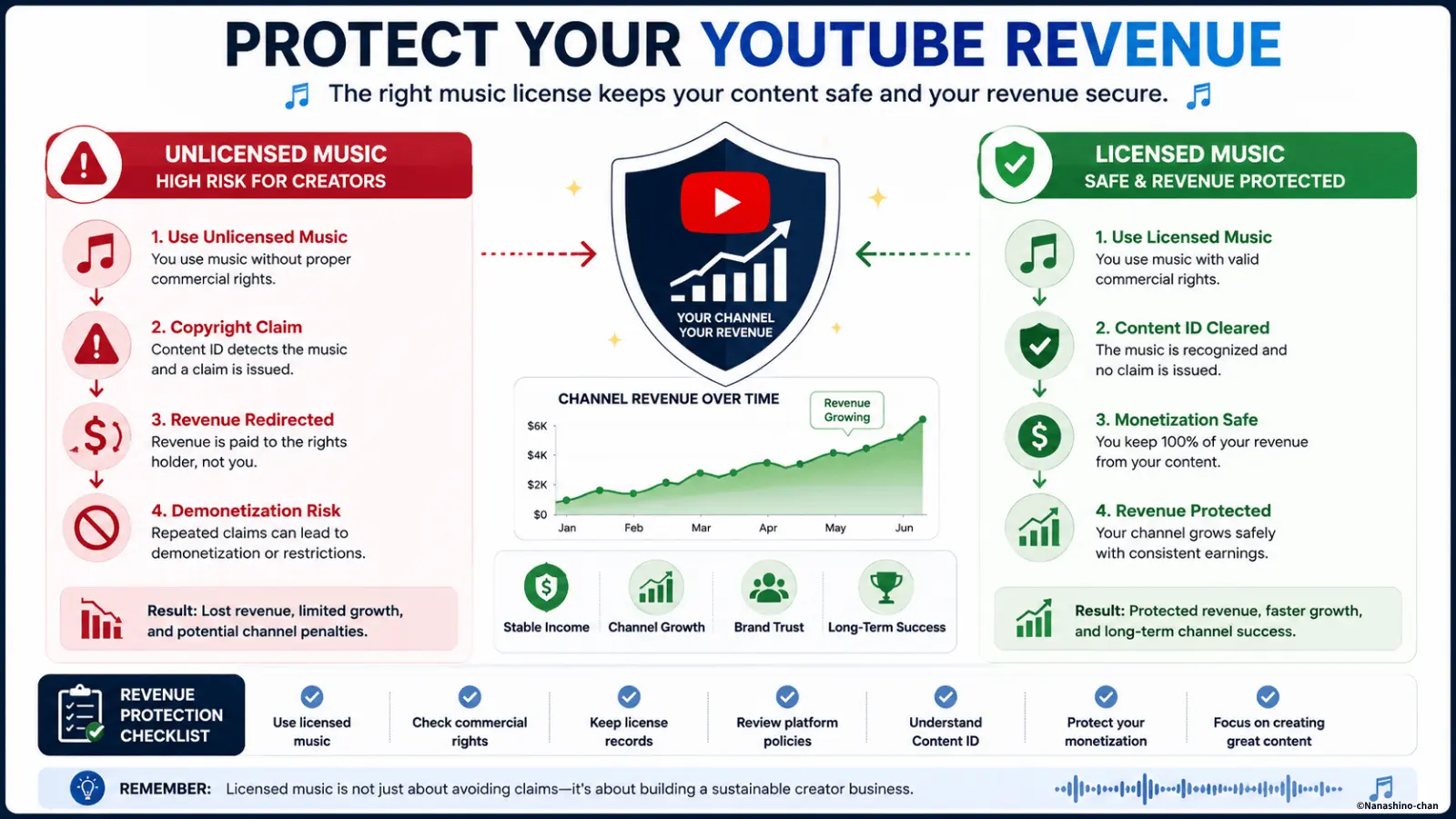
Direct Answer: How Do You Avoid Content ID Claims?
The safest workflow is to use music with clear licensing terms, confirm that YouTube use is allowed, check whether monetization is permitted, understand the track’s Content ID policy, and keep proof of license before uploading.
Avoiding Content ID claims is not about finding “magic claim-free music.” It is about using music with a clear source, clear rights, clear documentation, and a license that matches your actual video use.
- • Use music from a trusted, identifiable source
- • Check whether YouTube videos are allowed
- • Check whether monetization is allowed
- • Check whether sponsored or commercial use is allowed
- • Review Content ID and claim policies before upload
- • Keep proof of license or permission
- • Avoid streaming music, reposted audio, and unclear downloads
What Is a Content ID Claim?
A Content ID claim is a copyright-related notice that can appear when YouTube’s automated Content ID system detects matching copyrighted audio or video in an upload.
A claim is not always the same as a copyright strike. Depending on the copyright owner’s policy, the video may stay online, have ads placed on it, redirect revenue, be blocked in certain regions, or be tracked.
- • Monetization may be redirected or limited
- • Ads may appear on your video
- • The video may be blocked in some regions
- • Viewership data may be tracked by the rights holder
- • The creator may need to review, replace, mute, trim, or dispute the claim
For a full explanation, see: YouTube Content ID Guide.
Why Creators Get Content ID Claims
Most Content ID problems happen when creators use music without fully confirming the source, rights, license scope, or platform rules.
- • Using Spotify, Apple Music, or streaming tracks in videos
- • Using famous songs without permission
- • Downloading music from random websites
- • Assuming “free music” means commercial permission
- • Assuming “royalty-free” means claim-free
- • Giving credit without having a license
- • Using trending social media audio in monetized videos
- • Reusing “original audio” without checking the real source
- • Using music outside the license scope
- • Using music in ads, brand campaigns, or client work without sync or commercial rights
Common Myths That Lead to Content ID Claims
Many creators receive claims because they rely on assumptions instead of license terms. These are the most common mistakes.
“I bought the song, so I can use it.”
Buying music for listening usually does not grant YouTube upload, monetization, or commercial video rights.
“I gave credit, so I am safe.”
Credit may be required by a license, but credit alone usually does not replace permission.
“Royalty-free means Content ID-free.”
Royalty-free music can still have restrictions, Content ID registration, attribution requirements, or platform limits.
“If other creators use the song, I can use it too.”
Other creators may have permission, may be accepting claims, or may be using music outside the approved scope.
Pre-Upload Checklist to Reduce Content ID Claims
Use this checklist before publishing a YouTube video with music, especially if the video is monetized, sponsored, commercial, or made for a client.
- • Do I know the exact track title and artist?
- • Is the music officially released or clearly sourced?
- • Do I have permission to use the music in YouTube videos?
- • Does the license allow monetization?
- • Does the license allow YouTube Shorts?
- • Does the license allow sponsored content?
- • Does the license allow client work or agency deliverables?
- • Does the license allow ads or brand campaigns?
- • Does the license mention Content ID or claim handling?
- • Do I need attribution?
- • Have I saved proof of license or purchase?
- • Am I using the music within the allowed scope?
Music Sources: Lower Risk vs Higher Risk
Not all music sources carry the same level of clarity. The more commercial your video becomes, the more important it is to use a source with clear license terms.
| Music Source | Risk Level | What to Check |
|---|---|---|
| Streaming services | High | Listening access usually does not grant video usage rights. |
| Random free download sites | High | Check ownership, license terms, commercial use, and Content ID policy. |
| Trending social media audio | Medium to high | Check whether business, ad, or YouTube reuse is allowed. |
| YouTube Audio Library | Lower for standard YouTube use | Check license type, attribution, and whether the project fits the terms. |
| Commercial licensed music | Lower when terms are clear | Check monetization, commercial use, platform scope, and proof of license. |
| Direct artist licensing | Lower when documented | Confirm track identity, license holder, platforms, duration, and Content ID process. |
What Proof Should You Keep?
If a claim appears later, your documentation matters. A proper license record helps you verify what music you used and whether your project is covered.
- • Track title
- • Artist name
- • License holder or buyer name
- • Purchase receipt or license confirmation
- • License terms at the time of purchase
- • Permitted platforms
- • Commercial use permission
- • Monetization permission
- • Attribution requirements
- • Content ID claim instructions
- • Project name, upload date, and video URL
What If You Still Receive a Content ID Claim?
Even with licensed music, a claim can sometimes appear. This can happen when a track is registered with Content ID and the claim needs to be released or verified.
1. Review the Claim
Check the claimed track, claimant, affected section, and policy applied to the video.
2. Check Your License
Confirm that your license covers the video, platform, monetization, and commercial usage.
3. Follow the Process
Use the claim release or dispute instructions only when you have valid documentation.
Do not dispute a claim casually. Only dispute when you understand the reason and have a valid basis or proof of permission.
Use Cases Where Licensing Matters Most
The more commercial or long-term your content is, the more important clear music licensing becomes.
- • Monetized YouTube videos
- • YouTube Shorts
- • Sponsored creator videos
- • Product reviews and affiliate content
- • Brand campaigns and ads
- • Client editing projects
- • Agency deliverables
- • Podcasts and livestreams
- • AI-generated videos
- • E-commerce, SaaS, and product demo videos
ISRC, Track Identification, and Content ID
ISRC stands for International Standard Recording Code. It helps identify a specific sound recording. ISRC is not the same as Content ID, but both relate to identifying recordings and managing music rights.
Nanashino-chan’s officially distributed music is managed as identifiable recordings. Many releases are associated with formal recording metadata such as ISRC-based identification, helping clarify track identity and release context.
- ✔ Identifiable recordings
- ✔ Clearer artist and track identity
- ✔ Commercial licensing available
- ✔ Useful for YouTube creators, brands, agencies, and monetized videos
Track identification supports rights clarity, but it does not replace licensing. Always use the appropriate license for videos, ads, sponsored content, client work, or commercial campaigns.
Licensed Lo-Fi Music for YouTube Creators
Nanashino-chan provides original lo-fi music with commercial licensing options for YouTube creators, monetized videos, Shorts, podcasts, sponsored content, brand campaigns, AI videos, and client projects.
The catalog is designed for calm, modern creator content where music supports the video without overpowering narration, product visuals, tutorials, study sessions, or brand storytelling.
YouTube Creators
Music for monetized channels, Shorts, tutorials, podcasts, and creator businesses.
Brands & Agencies
Music for sponsored content, brand campaigns, product videos, ads, and client work.
Clearer Licensing
Commercial licensing helps creators keep documentation and reduce copyright uncertainty.
Preview Music Before You License
Listen to original lo-fi tracks before using them in YouTube videos, Shorts, sponsored content, AI videos, ads, brand campaigns, or client projects.
Browse the catalog → All Tracks
Official YouTube Copyright & Content ID Resources
YouTube policies and Content ID systems may change over time. Always review the latest official YouTube Help pages before publishing monetized, commercial, sponsored, or client-facing content.
- YouTube Content ID Overview
- YouTube Content ID Claims & Disputes
- YouTube Copyright Guidelines
- YouTube Copyright Strikes
- YouTube Audio Library Help
This page is an educational guide and not legal advice. Always review official YouTube guidance and the specific license terms for any music you use.
FAQ
Can you completely avoid Content ID claims?
You cannot guarantee that a platform system will never create a claim, but you can reduce Content ID problems by using music with clear licensing terms, checking Content ID policies, and keeping proof of permission.
How can YouTube creators reduce Content ID claims?
Creators can reduce Content ID claims by avoiding unclear music sources, using licensed music, checking whether monetization is allowed, saving license proof, and reviewing the track's Content ID policy before upload.
Does royalty-free music prevent Content ID claims?
Not always. Royalty-free music can still have restrictions, attribution requirements, platform limits, or Content ID registration. Always review the license carefully.
Can licensed music still receive a Content ID claim?
Yes. Licensed music can still receive a Content ID claim if the track is registered in the system. The creator may need to provide proof of license or follow the license holder's claim release process.
Can I use Spotify or Apple Music songs in YouTube videos?
Streaming or purchasing music for listening generally does not grant the right to upload or monetize that music in YouTube videos.
What should I keep as proof for YouTube music licensing?
Keep the track title, artist name, license holder, license terms, purchase receipt, permitted platforms, monetization permission, attribution requirements, and Content ID instructions.
Need Music with Clear YouTube Licensing?
Use original lo-fi music with commercial licensing options for YouTube creators, monetized videos, Shorts, sponsored content, brand campaigns, AI videos, ads, and client projects.
Related Pages
- YouTube Content ID Guide
- What Does Content ID Mean?
- How Content ID Works
- Content ID vs Copyright Strike
- How to Avoid Copyright Claims
- Music License for YouTube Creators
- Best Music Licenses for YouTube Monetization
- YouTube Audio Library vs Commercial Music
- How to Check If Music Is Copyright-Safe
- Licensing Page