YouTube Content ID Guide
YouTube Content ID is one of the most important copyright systems for creators. It can detect music, video clips, and other copyrighted material in uploaded videos, then apply a copyright owner’s policy to the video.
For monetized creators, YouTubers, editors, brands, agencies, and businesses, Content ID is not just a technical system. It can affect revenue, publishing, client delivery, sponsorships, and long-term channel safety.
This guide explains how Content ID works, why claims happen, what to do after a claim, and how licensed music can reduce copyright uncertainty before your next upload.
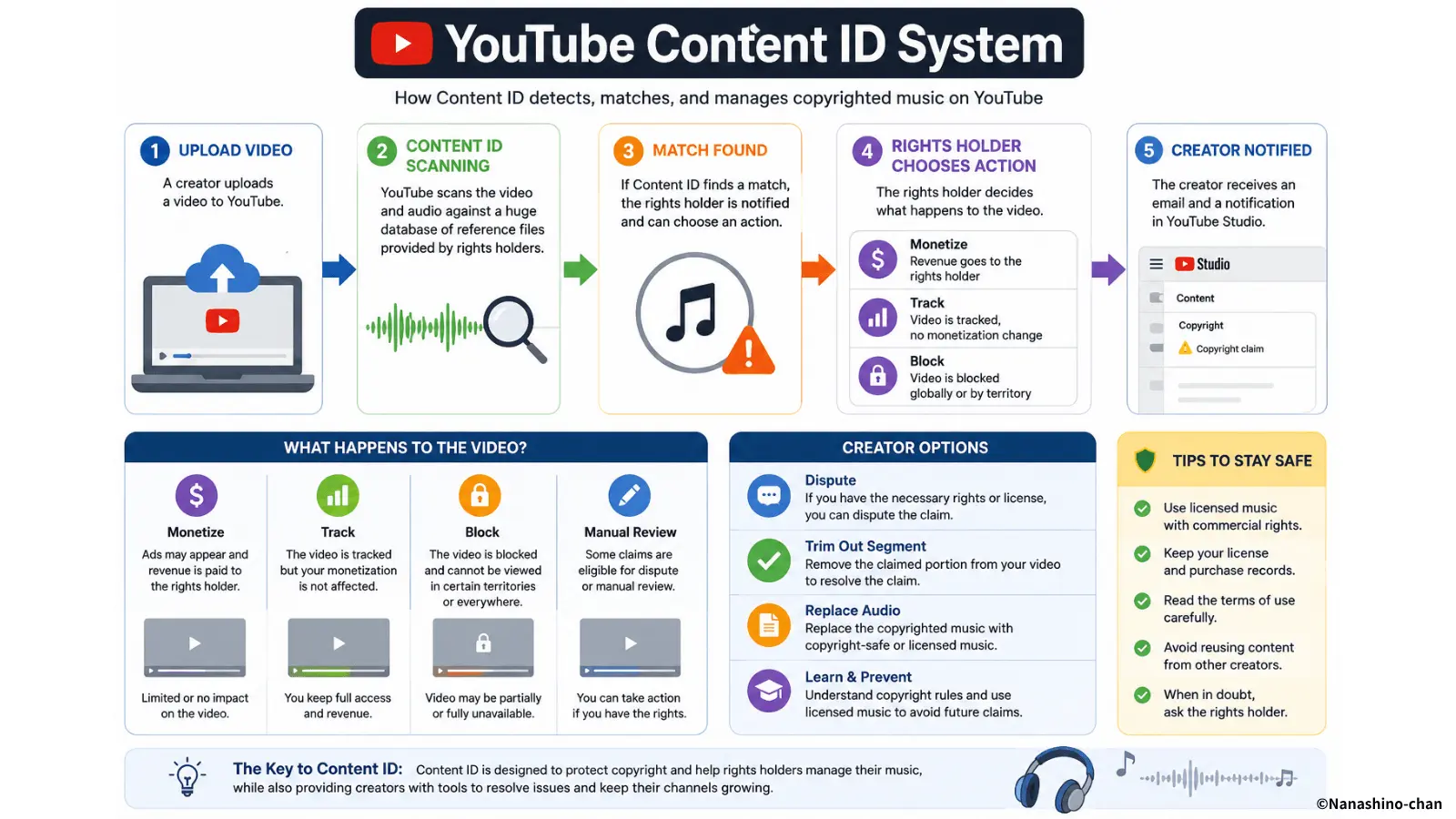
What Is YouTube Content ID?
YouTube Content ID is an automated copyright identification system. It compares uploaded videos against reference files provided by eligible copyright owners. These reference files can include sound recordings, music, video footage, or other copyrighted material.
When the system finds a match, a Content ID claim may appear on the video. The copyright owner’s policy can then affect monetization, visibility, tracking, or availability.
- • Content ID scans uploaded videos
- • It compares uploads against copyright owner reference files
- • Music and sound recordings often trigger matches
- • A match can create a Content ID claim
- • The rights holder’s policy may affect ads, revenue, regions, or visibility
Why Content ID Matters for YouTube Creators
A Content ID claim can be minor for a casual creator, but serious for a monetized channel, brand campaign, agency deliverable, or sponsored video. If music is claimed after publication, it can interrupt revenue, campaign approval, or client delivery.
Creators who publish regularly need a repeatable music workflow. That means choosing tracks carefully, checking license terms, saving proof, and understanding what happens if Content ID detects the music.
- • Monetization may be redirected or limited
- • Brand videos may require clean rights documentation
- • Sponsored content can be delayed by copyright issues
- • Client projects may need proof of music permission
- • YouTube Shorts, long-form videos, podcasts, and livestreams can all involve music rights
How the Content ID System Works
Content ID works by matching uploaded videos against copyrighted reference files. The exact details are handled by YouTube’s system, but creators can understand the general workflow.
- A copyright owner provides reference content to YouTube
- A creator uploads a video
- YouTube scans the uploaded video
- The system compares the upload with reference files
- If matching audio or video is found, a Content ID claim may appear
- The copyright owner’s policy is applied to the video
This process is automated, which means creators can receive claims even if they did not intend to infringe, even if the music was used as background audio, or even if the track is short.
What Is a Content ID Claim?
A Content ID claim is a copyright-related notice that appears when YouTube’s Content ID system finds matching material in a video. The claim usually comes from the copyright owner or the system managing that owner’s rights.
A Content ID claim does not always mean the video will be removed. Depending on the rights holder’s policy, the video may remain online, be monetized by the copyright owner, be blocked in some places, or be tracked.
- • The video may remain public
- • Ads may appear on the video
- • Revenue may go to the copyright owner
- • The video may be blocked in certain regions
- • Viewership data may be tracked by the copyright owner
- • The creator may need to review, replace, mute, trim, or dispute the claim
Content ID Claim vs Copyright Strike
A Content ID claim and a copyright strike are different. Many creators confuse them, but the distinction is important for channel safety.
| Term | Meaning | Typical Effect |
|---|---|---|
| Content ID | YouTube’s automated copyright identification system | Detects matching audio or video |
| Content ID claim | A claim created when Content ID finds a match | May affect monetization, visibility, tracking, or regional availability |
| Copyright strike | A more serious copyright enforcement action, usually related to a copyright removal request | Can affect channel standing |
For a beginner explanation, see: What Does Content ID Mean?
Why YouTube Creators Receive Content ID Claims
Creators usually receive Content ID claims because the uploaded video contains audio or video that matches a copyright owner’s reference material. Music is one of the most common triggers.
- • Using Spotify, Apple Music, or streaming tracks in videos
- • Using famous songs or commercial releases without permission
- • Downloading music from unclear websites
- • Using “royalty-free” music without checking the license
- • Using music outside the allowed license scope
- • Using remixes, samples, slowed versions, or reposted audio
- • Using tracks in ads, sponsored videos, or client projects without sync rights
- • Uploading music that is registered with Content ID but not properly cleared for your channel
Why Music Often Triggers Content ID
Music is easy for Content ID to detect because sound recordings can be matched against reference audio. Even a background track, intro, outro, sample, loop, or short clip can trigger a claim when it matches protected content.
This is why creators should avoid treating “music I found online” as automatically safe. A track may be downloadable, free, included in an app, or popular on social media, but still not licensed for your YouTube use.
- • Music can be detected even when used as background audio
- • Giving credit does not automatically prevent claims
- • Buying a song for listening does not grant upload rights
- • Royalty-free does not always mean claim-free
- • Licensed music can still be claimed if the release process requires verification
What Should You Do After a Content ID Claim?
If you receive a Content ID claim, do not panic. First, check what content was claimed, who made the claim, what policy was applied, and whether you have permission to use the content.
Your next step depends on your situation. If you used copyrighted music without permission, replacing or removing the audio may be safer. If you have a valid license, follow the license holder’s instructions and keep documentation ready.
1. Review the Claim
Check the claimed track, claimant, affected section, and policy applied to the video.
2. Check Your Rights
Confirm whether you have permission, a license, attribution details, or claim release instructions.
3. Choose an Action
You may accept the claim, replace the audio, mute the section, trim the video, or dispute if appropriate.
Do not submit a dispute unless you have a valid reason and supporting documentation. Misusing dispute tools can create additional problems.
How to Reduce Content ID Problems Before Uploading
The best Content ID strategy is prevention. Before uploading, check your music source, license scope, Content ID policy, and documentation.
- • Use music with clear licensing terms
- • Check whether YouTube monetization is allowed
- • Check whether Content ID claims may appear
- • Keep proof of license or permission
- • Avoid unclear audio sources and reposted social media music
- • Avoid using streaming tracks in YouTube videos
- • Check attribution requirements before publishing
- • Use commercial licensing for sponsored videos, ads, and client projects
Can Licensed Music Still Receive a Content ID Claim?
Yes. Licensed music can still receive a Content ID claim if the track is registered with Content ID. This does not always mean the creator did something wrong. It may mean the license holder uses Content ID for rights management and has a claim release process.
This is why creators should choose music with clear terms and keep proof of license. A good license should explain whether the track can be used on YouTube, whether monetization is permitted, and what to do if a Content ID claim appears.
- • Keep your license record
- • Save track title and artist name
- • Save purchase or permission confirmation
- • Follow the license holder’s claim release process
- • Avoid assuming “licensed” means “no claim can ever appear”
YouTube Content ID Checklist for Creators
Use this checklist before uploading a video that contains music.
- • Do I know the exact track title and artist?
- • Is the music officially released or clearly sourced?
- • Do I have permission to use it in YouTube videos?
- • Does the license allow monetization?
- • Does the license allow sponsored content or commercial use?
- • Does the license explain Content ID claims?
- • Do I need to include attribution?
- • Have I saved proof of license?
- • Am I using the music within the allowed scope?
- • Is this video for personal, monetized, brand, or client use?
ISRC, Track Identification, and Rights Management
ISRC stands for International Standard Recording Code. It helps identify a specific sound recording. ISRC is not the same as Content ID, but both relate to identifying music recordings and managing rights.
For creators, identifiable music is easier to verify than anonymous audio files. Nanashino-chan’s officially distributed music is managed as identifiable recordings, and many releases are associated with formal recording metadata such as ISRC-based identification.
- ✔ Identifiable recordings
- ✔ Clearer artist and track identity
- ✔ Commercial licensing available
- ✔ Useful for YouTube creators, brands, agencies, and monetized videos
Track identification supports rights clarity, but it does not replace licensing. Always use the appropriate license for videos, ads, sponsored content, client work, or commercial campaigns.
Licensed Lo-Fi Music for YouTube Creators
Nanashino-chan provides original lo-fi music with commercial licensing options for YouTube creators, monetized videos, Shorts, podcasts, sponsored content, brand campaigns, AI videos, and client projects.
The catalog is designed for calm, cinematic, modern creator content where music supports the video without distracting from narration, visuals, study sessions, product reviews, tutorials, or brand storytelling.
Monetized Videos
Music for YouTube channels, Shorts, tutorials, podcasts, and creator businesses.
Commercial Projects
Music for sponsored content, brand campaigns, ads, product videos, and client work.
Rights Clarity
Licensing helps creators keep better documentation and reduce copyright uncertainty.
Preview Music Before You License
Listen to original lo-fi tracks before using them in YouTube videos, Shorts, sponsored content, AI videos, ads, brand campaigns, or client projects.
Browse the catalog → All Tracks
Official YouTube Copyright & Content ID Resources
YouTube policies and Content ID systems may change over time. Always review the latest official YouTube Help pages before publishing monetized, commercial, sponsored, or client-facing content.
- YouTube Content ID Overview
- YouTube Content ID Claims
- YouTube Copyright Guidelines
- YouTube Copyright Strikes
- YouTube Audio Library Help
This page is an educational guide and not legal advice. Always review official YouTube guidance and the specific license terms for any music you use.
FAQ
What is YouTube Content ID?
YouTube Content ID is an automated copyright identification system that compares uploaded videos against reference files provided by eligible copyright owners.
Why do YouTube creators receive Content ID claims?
Creators receive Content ID claims when YouTube’s system finds matching copyrighted audio or video in an upload. Music, background tracks, remixes, samples, and reused video clips can trigger claims.
Is a Content ID claim the same as a copyright strike?
No. A Content ID claim is usually different from a copyright strike. A strike is generally connected to a formal copyright removal request, while a Content ID claim comes from YouTube’s automated matching system.
Can Content ID affect monetization?
Yes. A Content ID claim may affect monetization, redirect ad revenue, block the video in some regions, track viewership, or apply other rights holder policies.
Can licensed music still get a Content ID claim?
Yes. Some licensed music may still be registered with Content ID. In that case, creators may need to follow the license holder’s claim release process or provide proof of permission.
How can YouTube creators reduce Content ID problems?
Creators can reduce Content ID problems by using music with clear licensing terms, checking Content ID policies, keeping proof of license, avoiding unclear audio sources, and choosing commercially licensed music for monetized or sponsored videos.
Need Music with Clear YouTube Licensing?
Use original lo-fi music with commercial licensing options for YouTube creators, monetized videos, Shorts, sponsored content, brand campaigns, AI videos, ads, and client projects.
Related Pages
- What Does Content ID Mean?
- How Content ID Works
- Content ID vs Copyright Strike
- How to Avoid Content ID Claims
- How to Avoid Copyright Claims
- Music License for YouTube Creators
- Best Music Licenses for YouTube Monetization
- YouTube Audio Library vs Commercial Music
- ISRC and Shazam Music Identification
- Licensing Page