Music Rights for Video Creators
Video creators need more than good background music. They need to understand whether the music can legally be used in YouTube videos, social media posts, client work, paid ads, product demos, AI videos, podcasts, brand content, and commercial projects.
This guide explains the core music rights that matter for video creators: copyright, sync rights, master rights, composition rights, Content ID, commercial use, platform rules, and proof of music license.
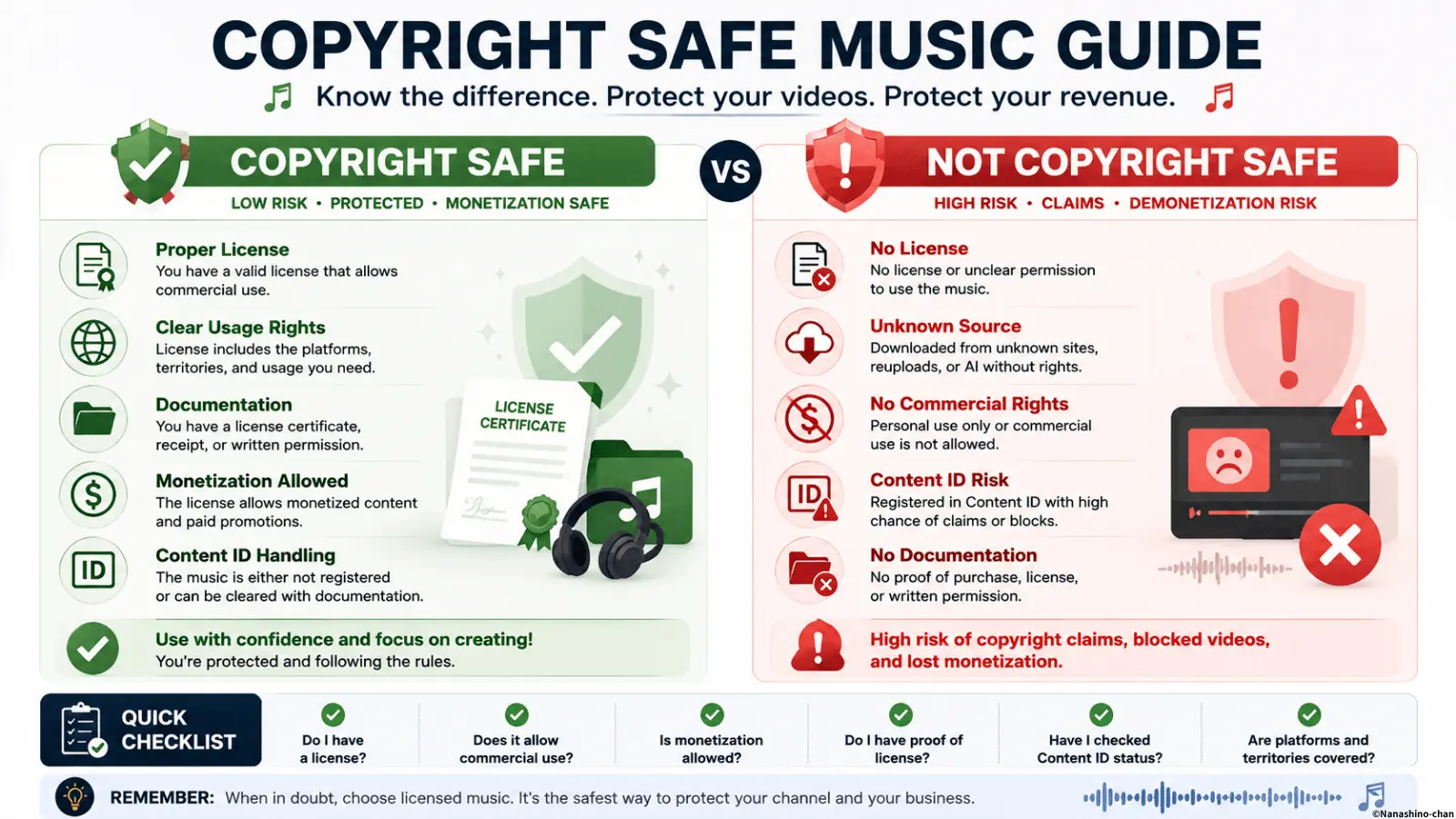
Direct Answer: What Music Rights Do Video Creators Need?
Video creators need permission to use music in the specific way their video will be published, monetized, distributed, advertised, or delivered to a client. That permission is usually handled through a music license.
The most important rights for video creators are synchronization rights, master recording rights, composition rights, commercial-use permission, platform-specific usage rights, and documentation that proves the music was licensed.
A track being available on YouTube, Spotify, Apple Music, TikTok, Instagram, or another platform does not automatically mean it can be used inside a video. Listening access and video usage permission are different things.
Music Rights Basics for Video Creators
Music rights can feel complicated because a single track may involve multiple rights. For video creators, the practical question is usually simple: “Do I have permission to use this exact music in this exact video project?”
| Right or Term | What It Means | Why Video Creators Should Care |
|---|---|---|
| Copyright | Legal protection for music, recordings, and creative works. | Using copyrighted music without permission can cause claims, takedowns, demonetization, or legal problems. |
| Composition Rights | Rights in the underlying song, melody, harmony, and composition. | A video may need permission for the composition, not only the sound recording. |
| Master Rights | Rights in the specific sound recording that is used. | Using the actual audio file in a video usually involves the recording rights. |
| Sync Rights | Permission to synchronize music with visual media. | This is central for YouTube videos, ads, reels, AI videos, brand films, and client videos. |
| Commercial Use | Use connected to business, monetization, promotion, clients, ads, brands, or revenue. | Many creator videos become commercial when they are monetized, sponsored, client-facing, or brand-related. |
| Proof of License | Documentation showing that the music was licensed for the project. | Useful for Content ID, client review, platform questions, legal checks, and future reuse. |
Why Music Rights Matter for Video Creators
Music can make a video feel professional, emotional, memorable, and complete. But if the rights are unclear, that same music can become a problem after upload, monetization, client delivery, or ad launch.
Music rights matter because video content often moves across platforms and use cases. A video may start as an organic post, then become a paid ad, a client deliverable, a sales asset, a website embed, or a short-form edit.
YouTube Monetization
Music rights can affect whether a video receives a claim, loses monetization, or needs a dispute response.
Client Work
Freelancers and agencies may need to prove that music used in a client video is licensed for that client’s use.
Paid Advertising
Ads usually need clearer music rights than ordinary personal posting, especially for brands and campaigns.
Social Media Distribution
Instagram, TikTok, Facebook, LinkedIn, and YouTube all have different systems and rights expectations.
AI Video Production
AI-generated visuals do not automatically clear music rights. Background music still needs permission.
Future Reuse
A track used in one edit may later be reused in cutdowns, ads, presentations, reels, or other commercial assets.
Streaming Music Is Not the Same as Video Usage Permission
Listening to music on YouTube, YouTube Music, Apple Music, Spotify, TikTok, Instagram, or another platform does not automatically grant permission to use that music inside a video.
For video creators, the important question is not whether the song is available to listen to. The important question is whether the creator has permission to synchronize the music with visual content and publish it in the intended context.
Common Video Creator Use Cases That Need Music Rights
Many video formats involve music rights. Some uses are low-risk when properly licensed; others require stronger commercial or sync licensing clarity.
- • YouTube videos and YouTube Shorts
- • Monetized YouTube channels
- • Instagram Reels and branded posts
- • TikTok videos and TikTok ads
- • Facebook videos and Meta ads
- • LinkedIn videos and B2B marketing clips
- • Client videos delivered by freelancers or agencies
- • Sponsored content and influencer campaigns
- • Product demo videos and SaaS walkthroughs
- • Corporate videos and company profile videos
- • Real estate videos and property tours
- • AI-generated videos and AI avatar content
- • Podcast intros, outros, and video podcasts
- • Online courses, tutorials, and training videos
- • Website hero videos and landing page videos
- • Paid advertisements and commercial campaigns
Music Rights by Platform and Publishing Context
A music license should match where and how the video will be published. The same music may have different implications depending on whether the video is organic, monetized, sponsored, client-facing, or used as a paid advertisement.
| Platform or Context | Rights Issue | What to Confirm |
|---|---|---|
| YouTube | Content ID, monetization, copyright claims, Shorts, public uploads. | Check YouTube use, monetization permission, Content ID policy, and proof of license. |
| Instagram Reels | Personal vs business posting, branded content, ads, platform audio rules. | Check whether the music can be used in commercial social video and paid campaigns. |
| TikTok | Organic posting, commercial use, brand deals, ads, account type restrictions. | Confirm commercial-use rights before using music in brand or ad content. |
| B2B marketing, corporate videos, recruitment, product demos. | Confirm business video use and company social media use. | |
| Client Work | The creator may not be the final business user. | Confirm client work, transfer, delivery, and project scope. |
| Paid Ads | Advertising usually requires stronger rights clarity. | Confirm ad platforms, campaign period, territory, and media scope. |
| AI Videos | AI-generated visuals do not clear music rights. | Confirm commercial use, sync use, client use, and documentation. |
Content ID: What Video Creators Should Understand
Content ID and similar rights management systems can detect music in uploaded videos. A claim does not always mean the creator did something wrong, but it can affect monetization, visibility, client approval, or campaign delivery.
If a creator has licensed the music, proof of license can help explain the permitted use. This is why creators should keep records before uploading, not after a claim appears.
Records to keep for Content ID questions
- • Track title and artist name
- • License terms
- • Receipt, invoice, or order confirmation
- • Licensee name or company name
- • Project name and final video title
- • YouTube video URL or upload link
- • Claim ID or screenshot if a claim appears
- • Notes from the licensor about Content ID or copyright claims
Personal Use vs Commercial Use for Video Creators
A common mistake is assuming that a video is personal because it was made by an individual creator. But the use can become commercial depending on the context.
A video may be commercial if it is monetized, sponsored, used for a brand, delivered to a client, used in a paid ad, promotes a product, supports a business, or appears in a marketing campaign.
| Video Situation | Likely Rights Concern | Recommended Direction |
|---|---|---|
| Personal hobby video | May still trigger claims if music is copyrighted. | Use music with clear permission, even if the video is non-commercial. |
| Monetized YouTube video | Monetization can make rights questions more important. | Use a license that allows YouTube monetization. |
| Sponsored post | Brand involvement usually makes the use commercial. | Use a commercial or sync license. |
| Client video | The video is created for another business or customer. | Confirm the license allows client work and the client’s intended use. |
| Paid advertisement | Advertising rights are often more limited than ordinary posting. | Use a sync license or ad-approved commercial license. |
| AI-generated brand video | AI production does not remove music rights requirements. | Confirm commercial, sync, and platform rights before publishing. |
Why Sync Rights Matter for Videos
When music is placed under video, synchronized with visuals, edited into a reel, used in an ad, added to an intro, or placed behind a product demo, the project usually involves synchronization.
For video creators, sync rights are one of the most important music rights because most video uses are not just listening. They combine music with visual media.
- • YouTube videos synchronize music with visuals
- • Instagram Reels and TikTok videos synchronize music with visual clips
- • Ads synchronize music with brand messaging
- • Client videos synchronize music with business content
- • Product demos synchronize music with interface or product visuals
- • AI videos synchronize music with generated or edited visuals
For a deeper explanation, see What Is Sync Licensing?.
Music Rights for AI Video Creators
AI video tools can generate scenes, avatars, edits, scripts, voices, subtitles, product visuals, social clips, and ad variations. But AI-generated visuals do not automatically clear the music rights.
If the final AI-generated or AI-assisted video uses background music, that music still needs permission for the intended use. This is especially important for YouTube channels, ads, branded videos, product demos, online courses, client work, and commercial campaigns.
- • AI-generated visuals do not prove music permission
- • AI avatar videos still need music rights
- • AI YouTube channels should keep license documentation
- • AI commercial videos may need sync or commercial rights
- • Agencies using AI tools should document music rights for clients
Music Rights Checklist Before Publishing a Video
Before publishing, delivering, monetizing, or advertising a video with music, creators should confirm the license against the real use case.
- • Do you know the track title and artist name?
- • Do you know who owns or licenses the music?
- • Do you have permission to synchronize the music with video?
- • Is commercial use allowed?
- • Is YouTube publishing allowed?
- • Is YouTube monetization allowed?
- • Are Instagram, TikTok, Facebook, LinkedIn, or other social platforms covered?
- • Are paid ads or boosted posts allowed?
- • Is client work allowed?
- • Is AI-generated or AI-assisted video use allowed?
- • Can the track be edited, shortened, looped, or faded?
- • Can the same track be reused across multiple videos?
- • Are Content ID rules or claim instructions explained?
- • Do you have proof of music license saved?
Keep Proof of Music Rights
The safest workflow is to keep music rights documentation with every project. This is important for creators, agencies, freelancers, production teams, brands, and AI video creators.
Documentation does not need to be complicated, but it should be complete enough to answer basic questions about track ownership, license scope, purchase proof, project use, and platform distribution.
Save License Terms
Keep the document or page that explains exactly what the license allows.
Save Purchase Proof
Keep the receipt, invoice, order confirmation, or purchase record.
Save Project Notes
Record where the music was used, what video it appears in, and which platforms were used.
For a detailed checklist, see Music License Documentation Checklist and Proof of Music License.
Common Music Rights Mistakes Video Creators Make
Most music rights problems happen because the creator assumes the use is allowed without checking the license scope. The risk increases when the video becomes public, monetized, commercial, sponsored, or client-facing.
- • Using streaming music in uploaded videos
- • Assuming “royalty-free” means unlimited use
- • Using personal-use music in client projects
- • Running ads with music licensed only for organic posting
- • Uploading monetized YouTube videos without checking Content ID rules
- • Reusing one track across multiple campaigns without checking scope
- • Delivering videos to clients without license proof
- • Assuming AI-generated videos do not need music rights
- • Forgetting to save the license terms after purchase
- • Confusing platform audio access with commercial usage permission
Official Platform Copyright Policies
Major platforms explain copyright rules separately from ordinary music listening. Purchasing, streaming, or accessing music does not automatically grant rights for uploading, monetization, advertising, business use, or social media distribution.
-
```
- YouTube Copyright Guidelines
- Instagram Copyright Information
- Facebook Copyright Policy
- TikTok Copyright Policy ```
Copyright policies and platform rules may change over time. Always review the latest official guidelines before publishing monetized or commercial content.
How Nanashino-chan Licensing Helps Video Creators
Nanashino-chan music is positioned for creators, agencies, brands, AI video creators, product teams, and businesses that need music for video use.
A clear licensing structure helps video creators avoid vague assumptions about “free music,” “copyright-free music,” or platform audio access. For commercial video use, the key issue is whether the license matches the project.
- • Clear commercial licensing direction
- • Useful for YouTube videos, ads, client work, AI videos, brand content, and social media campaigns
- • Helps separate listening access from actual usage permission
- • Supports proof of music license and project documentation workflows
- • Designed for creators who need music for visual storytelling and commercial content
FAQ
What music rights do video creators need to understand?
Video creators should understand copyright, master rights, composition rights, sync rights, commercial use, platform rules, Content ID, license scope, and proof of music license before using music in videos.
Can video creators use music from streaming services?
No. Streaming, downloading, or purchasing music for listening generally does not grant permission to use that music in videos, ads, client work, social media campaigns, AI videos, podcasts, apps, or commercial projects.
What is sync licensing for video creators?
Sync licensing is permission to synchronize music with visual media such as YouTube videos, ads, short-form videos, brand films, product demos, AI videos, client projects, and other video content.
What is Content ID for video creators?
Content ID is a rights management system that can detect music in uploaded videos. A video may receive a claim if the music is registered, even when the creator has a license, so keeping proof of music license is important.
Do creators need music licenses for client videos?
Yes. Client videos are usually commercial or business use. Video creators, agencies, freelancers, and production teams should confirm that the music license allows client work and the intended platforms.
Do AI-generated videos need music rights?
Yes. AI-generated or AI-assisted videos still need proper music rights if they use background music in public, monetized, commercial, client-facing, sponsored, or brand-related content.
Is royalty-free music always safe for videos?
Not automatically. Royalty-free music may still have restrictions. Creators should check whether the license allows YouTube, monetization, social media, client work, paid ads, commercial use, and Content ID handling.
What should video creators save after licensing music?
Save the license terms, receipt, order confirmation, track title, artist name, project name, final video URL, platform list, and any Content ID or copyright claim instructions.
Need Music Rights Clarity for Your Videos?
Use licensed music for YouTube videos, ads, client work, social media, AI videos, podcasts, product demos, brand content, and commercial campaigns with clearer rights and documentation.
► View Licensing OptionsRelated Pages
- Proof of Music License
- Music License Documentation Checklist
- Music License for Agencies
- Music License for Business Videos
- Music License for Client Videos
- Music License for Marketing Campaigns
- How to Choose a Music License for Videos
- How to Avoid Content ID Claims
- Content ID vs Copyright Strike
- What Is Sync Licensing?
- What Is a Master License?
- Music Licensing vs Sync Licensing
- Music Licensing for Commercial Use Guide
- Licensing Page
- Contact